
Morse Code Translator: Text to Morse and Morse to Text
Use the Morse code translator to convert text into dots and dashes or decode Morse code into readable text. Enter a short message, check the output, and listen to its rhythm with audio playback.
Try HELLO WORLD:
…. . .-.. .-.. — / .– — .-. .-.. -..
Each group represents a letter. Spaces separate letters, and the slash separates words.
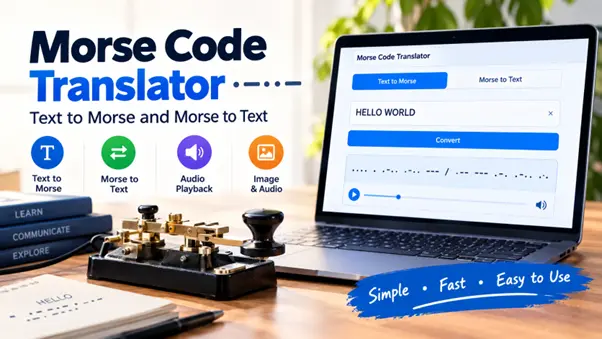
How to Use the Morse Code Translator?
Convert Text to Morse Code
1. Select Text → Morse.
2. Type or paste your message.
3. Review the Morse output.
4. Copy the result, keeping the spaces between groups.
For example, CODE becomes:
-.-. — -.. .
Read it one letter at a time: C is -.-., O is —, D is -.., and E is ..
Start with letters and numbers when checking a message. If you include unusual punctuation or other symbols, review their output individually.
Decode Morse Code to Text
1. Select Morse → Text.
2. Enter a period (.) for each dot and a hyphen (-) for each dash.
3. Separate letters with spaces and words with a forward slash (/).
4. Read the decoded message and check any unexpected characters.
For example:
…. .. / – …. . .-. .
This reads HI THERE.
Keep the symbols for each letter together. … represents S, while . . . represents three separate E characters.
Listen to the Translation
Play the message to hear its dots, dashes, and pauses. Adjust the speed to a pace you can follow.
Speed controls how quickly the message plays. Pitch controls how high or low the tone sounds. When checking a translation, follow the written groups as you listen, then replay the message without looking.
Decode Morse Code From Images or Audio
Choose the input method that matches your message.
| Your starting point | Tool to use | What to check |
| Words you want to encode | Text-to-Morse translator | Spelling and punctuation |
| Typed dots and dashes | Morse code decoder | Letter and word boundaries |
| A picture containing Morse symbols | Image translator | Clear marks and visible spacing |
| A recording of Morse tones | Audio translator | Distinct beeps and pauses |
| Morse tones playing nearby | Live microphone option | Microphone permission and input device |
Morse Code in an Image
Use the Morse code image translator for a screenshot, photograph, or scan containing dots and dashes. The image tool accepts PNG, JPG, and WebP files.
Choose a sharp image with clear contrast. Keep the whole sequence visible, including gaps between letters. Compare the detected Morse with the original picture before accepting the result. The threshold and invert controls can help separate the marks from the background.
The picture must contain Morse symbols. An ordinary photograph does not automatically contain a Morse message.
Morse Code in a Recording
Use the Morse code audio translator for a recording of Morse beeps or live microphone input.
Audio decoding recognizes incoming signals. Audio playback generates signals from text or typed Morse. Speaking a sentence into a microphone is a different task and requires speech recognition before the words can be encoded.
If live listening does not start, check microphone permissions and the selected input device. Browser microphone capture requires permission and a secure context, normally an HTTPS page. Browser microphone requirements
Fix Common Morse Decoding Problems
An unexpected result often becomes easier to understand when you check one character group at a time.
Check Letter and Word Spacing
Spacing changes meaning:
| Morse input | Decoded text |
| … | S |
| .. . | IE |
| . . . | EEE |
These readings follow the ITU character mappings.
A sequence without letter boundaries can have more than one interpretation. Keep the original spacing whenever you copy a message.
Check Symbols Copied From Other Sources
Documents and websites sometimes display decorative dots, long dash characters, or unexpected line breaks. If the input is not recognized, replace the symbols with ordinary periods and hyphens.
Also look for:
· A missing dot or dash.
· An extra space inside a letter.
· A missing slash between words.
· A character copied twice.
· A cropped mark in an image.
For audio, compare the result with the recording. Recognition depends on identifying the tones and their pauses. Morse Code World’s decoder documentation explains how frequency, volume thresholds, and timing affect its detection process. Audio decoding explanation
Morse Code Chart
Use the charts below to check letters, numbers, and common punctuation. They show International Morse Code patterns. Individual tools may support different subsets of punctuation and other signs. ITU International Morse Code reference
Morse Code Alphabet
| Letter | Morse | Letter | Morse |
| A | .- | N | -. |
| B | -… | O | — |
| C | -.-. | P | .–. |
| D | -.. | Q | –.- |
| E | . | R | .-. |
| F | ..-. | S | … |
| G | –. | T | – |
| H | …. | U | ..- |
| I | .. | V | …- |
| J | .— | W | .– |
| K | -.- | X | -..- |
| L | .-.. | Y | -.– |
| M | — | Z | –.. |
Morse Code Numbers
Each digit has a five-element pattern. Convert longer numbers one digit at a time.
| Number | Morse | Number | Morse |
| 0 | —– | 5 | ….. |
| 1 | .—- | 6 | -…. |
| 2 | ..— | 7 | –… |
| 3 | …– | 8 | —.. |
| 4 | ….- | 9 | —-. |
Common Morse Code Punctuation
| Character | Morse |
| Period . | .-.-.- |
| Comma , | –..– |
| Question mark ? | ..–.. |
| Apostrophe ‘ | .—-. |
| Hyphen – | -….- |
| Slash / | -..-. |
| At sign @ | .–.-. |
A slash used between words in typed Morse is a separator. The pattern -..-. represents an actual slash character in the message.
For a broader introduction, visit the Morse code guide.
How Morse Code Works?
Morse code represents characters through short and long signals called dots and dashes. Written Morse shows their patterns; audio Morse communicates those patterns through signal duration and pauses.
The charts on this page use International Morse Code. ITU currently lists Recommendation M.1677-1, published in October 2009, as the version in force. Current ITU recommendation
Dots, Dashes, and Pauses
Standard timing uses the length of a dot as one unit:
| Element | Duration |
| Dot | 1 unit |
| Dash | 3 units |
| Pause within a character | 1 unit |
| Pause between letters | 3 units |
| Pause between words | 7 units |
These durations are relative. Faster playback shortens the unit while preserving the standard proportions. ITU timing rules
In typed Morse, a space marks a letter boundary. During transmission, the corresponding boundary is a pause.
WPM and Farnsworth Spacing
WPM means words per minute. Morse speed commonly uses the reference word “PARIS,” including its following word gap, to define the timing.
Farnsworth spacing preserves the faster rhythm of individual characters while adding time between characters and words. This gives learners more time to recognize what they heard. It changes the spacing rather than slowing every part of the signal equally. ARRL’s Morse timing explanation
Choose settings that let you follow a short message. Adjust them as your recognition improves rather than aiming for a fixed learning deadline.
Common Morse Code Messages
These examples are useful for checking a translation or practicing by ear.
| Message | Morse code |
| HI | …. .. |
| HELLO | …. . .-.. .-.. — |
| HELP | …. . .-.. .–. |
| I LOVE YOU | .. / .-.. — …- . / -.– — ..- |
| SOS, written as separate letters | … — … |
Follow the HELLO in Morse code guide for a letter-by-letter example.
The SOS distress signal has a special transmission pattern: three dots, three dashes, and three dots sent as one continuous group, without normal letter-length pauses. SOS transmission explanation
The U.S. Coast Guard includes SOS among recognized distress signals. Use it only where it will not be mistaken for a real call for help. Our SOS Morse code guide provides more detail. U.S. Coast Guard navigation rules
Practice Reading Morse Code
Start with a short message you can check easily.
1. Enter a familiar word.
2. Compare its letters with the Morse alphabet.
3. Play the audio while following the symbols.
4. Look away and write down what you hear.
5. Compare your answer and repeat the difficult characters.
Change one letter between attempts to give yourself a new listening task.
For a school activity, exchange short coded clues. For an engineering demonstration, compare a known message with an LED or buzzer’s output. For a team puzzle, provide the chart and ask participants to decode a brief instruction.
Where Morse Code Is Used Today?
Amateur radio: Morse communication is commonly called CW. ARRL provides information and learning resources for this operating mode. ARRL’s CW overview
Aviation navigation: VOR facilities can identify themselves using Morse. The FAA also explains that some equipment decodes the identifier for the pilot. FAA navigation guidance
Alternative text input: Google documents a Morse keyboard in Gboard for English (United States) on supported Android devices. It can work with accessibility services and external switches. Google’s Morse keyboard instructions
Frequently Asked Questions
What Is the Difference Between a Morse Code Translator and a Decoder?
A decoder converts Morse patterns into text. An encoder converts text into Morse. “Translator” and “Morse code converter” commonly describe tools that offer both directions.
Does Morse Code Translate Between Languages?
No. Encoding changes how characters are represented, not the language or meaning of the words. An English sentence remains English when converted into Morse.
Do I Need to Memorize the Morse Alphabet?
No. You can use the translator without knowing every pattern. The chart helps when you want to verify a character or understand an unexpected result.
Does Morse Distinguish Uppercase and Lowercase Letters?
International Morse does not assign separate patterns to uppercase and lowercase versions of a letter. A and a share the same pattern, .-. A decoder’s capitalization is a display choice. ITU alphabet reference
Can Every Symbol or Emoji Be Converted?
International Morse does not define a pattern for every Unicode character or emoji. Check unfamiliar symbols individually. If a symbol is unsupported, spell out its meaning rather than assuming it was included in the result.
Can Morse Code Be Decoded Without Spaces?
Sometimes a person can infer a likely message from context, but the result may be ambiguous. Reliable decoding needs character boundaries, whether those appear as written spaces or timed pauses.
Is Morse Code Encrypted?
Morse encoding alone does not protect a message’s confidentiality. Its patterns are publicly documented, so someone with a chart or decoder can read a correctly formed message.
Do US Amateur Radio Licenses Require a Morse Test?
No. The FCC eliminated the Morse proficiency examination requirement. Learning Morse remains useful for people who want to operate CW, but it is not a required licensing test. FCC Report and Order