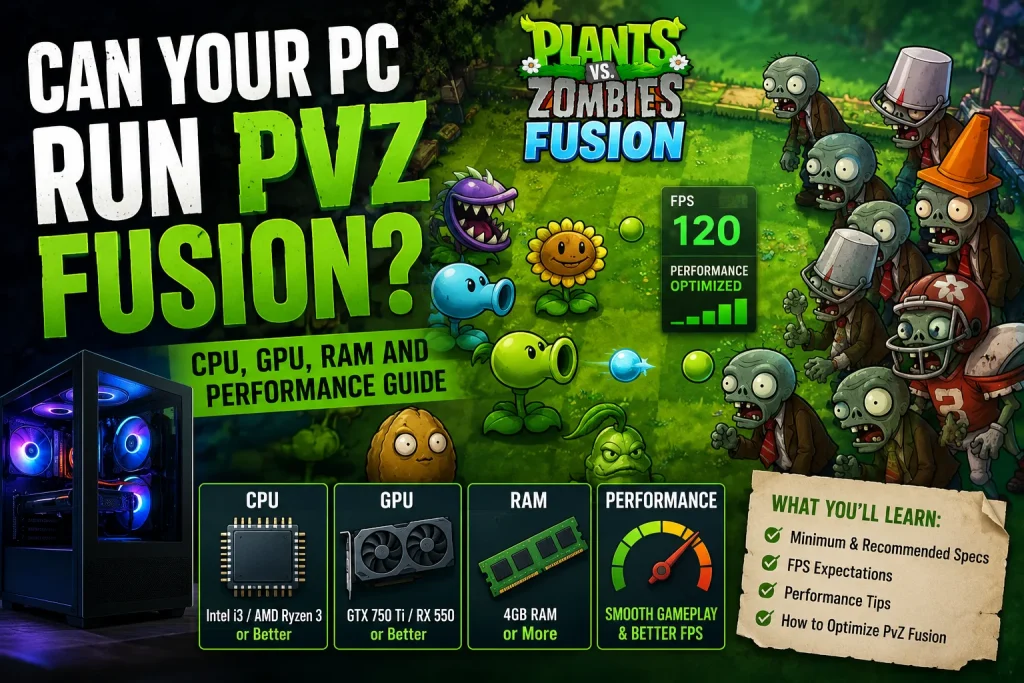
Can Your PC Run PvZ Fusion? CPU, GPU, RAM and Performance Guide
Plants vs. Zombies was never a demanding game. The same was mostly true for Plants vs. Zombies 2. So, when players search for PvZ Fusion system requirements, many expect a simple answer: “Yes, almost any PC can run it.”
That is mostly true, but there is a little more to it.
PvZ Fusion is not as simple as the original 2D tower defense game. It is a fan-made expansion built on the original game. It adds new plants, zombies, fusion combinations, and more effects on the screen during later waves. These changes do not make it a demanding game, but they can make the CPU work harder than it did in the original PvZ.
This guide explains what your CPU, GPU, and RAM do while you play. It also explains how to find out what is causing performance problems and whether you really need to upgrade your hardware.
What Is PvZ Fusion?
PvZ Fusion is a fan-made mod based on the Plants vs. Zombies formula. You can download and install PvZ Fusion easily. It was created by a modder known as BlueFly, and its main feature is the fusion system. It was created by a modder known as BlueFly, and its main feature is the fusion system. Instead of using one plant with one fixed ability, players can combine two plants to create a hybrid with abilities from both plants.
For example, a ranged plant can be combined with a plant that slows enemies. The result can attack zombies while also slowing them down.
This fusion system is one reason why PvZ Fusion can have different performance needs than the original game. Some fusion combinations can create several effects at the same time, including projectiles, status effects, and area effects. The game can also have many plants and zombies active on the screen at once.
It is still a 2D game, but it can perform more calculations per frame than the original PvZ.
There is also a PC version and an Android version, and they are not always run in the same way. The Android version runs directly on Android devices, while the PC version may be available as a native Windows build or through an Android emulator, depending on the release.
This difference is important when looking at system requirements because an emulator can use extra system resources in addition to what the game itself needs.
PvZ Fusion PC System Requirements
There is an important point to understand before looking at the numbers: PvZ Fusion does not have an official system requirements list published by its developer like a major PC game.
It is a fan-made project, not a commercial PC game with an official store page showing minimum and recommended hardware. So, anyone presenting exact official requirements is likely making assumptions.
The requirements below are practical guidance. They are based on the type of game PvZ Fusion is and the extra effects it can create compared with the original game. They also consider what is normally needed to run Plants vs. Zombies games and Android emulators on a PC.
Minimum Hardware to Run PvZ Fusion
| Component | Practical Minimum |
| CPU | Dual-core, roughly 2010 or newer generation |
| RAM | 4GB |
| GPU | Any integrated graphics from the last decade |
| Storage | 2–3GB free |
| OS | Windows 7 or newer |
| Display | 1280×720 or higher |
At this level, the game should run. However, you may notice some slowdowns during the busiest late-game waves when many fusion combinations are active.
The early and middle parts of the game should generally be fine.
Recommended PC Specifications
| Component | Recommended |
| CPU | Quad-core, mid-range from the last 5–6 years |
| RAM | 8GB |
| GPU | Entry-level dedicated GPU or a recent integrated chip, such as Intel Iris or newer AMD APUs |
| Storage | SSD preferred, but not required |
| OS | Windows 10/11 |
With this level of hardware, busy scenes with many fusion effects should run better. You do not need an expensive gaming PC to play the game. A PC from the last few years that works well for normal daily tasks should be enough.
How CPU Affects PvZ Fusion Performance
The CPU is one of the most important parts to consider when looking at PvZ Fusion performance.
Your CPU handles much of the game logic. This includes plant behavior, zombie movement, fusion effects, and the interactions between different plants and zombies.
In the original PvZ, this workload was small enough that almost any CPU from the last 15 years could handle it easily. PvZ Fusion adds more work because of its fusion system, extra effects, and larger number of units and interactions.
An older or weaker CPU usually will not stop the game from running completely. Instead, you may notice stuttering during busy waves. These slowdowns are more likely to happen when there are many plants, zombies, and active effects on the screen.
This can look like a graphics problem, but it may actually be caused by the CPU struggling to keep up with all the game calculations.
Signs Your CPU Is Limiting Performance
Here are some common signs that your CPU may be the problem:
- CPU usage stays very high, especially during busy waves.
- FPS drops when more plants, zombies, and effects appear on the screen.
- GPU usage stays relatively low while CPU usage is very high.
- Stuttering happens even when you have a capable graphics card.
If you are seeing these signs, buying a better GPU may not solve the problem. The issue may be a CPU bottleneck, which we will explain in more detail below.
Does PvZ Fusion Need a Dedicated GPU?
Not really. This is one part of the answer that is quite simple.
PvZ Fusion is a 2D game. It does not need to render complex 3D objects, lighting, or shadows. The GPU mainly handles sprites, effects, and the user interface. This is much lighter than the work a dedicated graphics card is designed to handle.
For most players, integrated graphics from the last several years should be enough. A dedicated GPU can become more useful at higher resolutions or when you run the game through an emulator along with other software in the background. An emulator adds extra rendering work that the normal game does not have.
If your PC can handle everyday tasks and light games without problems, your GPU is unlikely to be the main reason for poor PvZ Fusion performance.
How to Tell If Your GPU Is the Problem
Your GPU may be the problem if:
- GPU usage stays close to 100% while CPU usage remains moderate.
- FPS improves clearly when you lower the resolution or visual settings.
- Performance problems happen regularly instead of only during busy waves with many effects.
- Frame drops also happen during simple scenes with few plants, zombies, and effects.
If you do not see these signs, your GPU is probably not the main problem. In that case, check the CPU-related signs discussed earlier.
How Much RAM Does PvZ Fusion Need?
RAM stores the game’s active data, including loaded files, the current level, and other programs running on your PC.
For a 2D game like PvZ Fusion, the RAM requirement is fairly low. 4GB is enough to run the game, while 8GB provides more comfortable space, especially if you are using an emulator or keeping a browser with many tabs open.
However, having more RAM does not automatically give you higher FPS.
RAM mainly helps prevent slowdowns when your system runs out of available memory. It does not make the game render faster once you already have enough RAM.
So, if you already have 8GB of RAM and still experience performance problems, the CPU or background software is more likely to be the cause than the amount of RAM.
CPU Bottleneck vs GPU Bottleneck in PvZ Fusion
This is one of the most useful things to understand before upgrading your PC. It can help you find out what is actually causing the performance problem.
A CPU bottleneck happens when the CPU is close to its maximum workload while the GPU still has extra capacity. The game may want to do more work, but the CPU cannot process the required instructions fast enough.
Because PvZ Fusion has many effects, fusion combinations, and game calculations happening at the same time, a CPU bottleneck can be more common in this game.
A GPU bottleneck is the opposite. The GPU reaches its limit while the CPU still has room to work. This is less common in a 2D game, but it can happen with older integrated graphics or when using very high resolutions.
You can check which component is causing the problem with Windows Task Manager using the Performance tab. You can also use a monitoring overlay such as MSI Afterburner while playing.
Here is a simple way to check:
- Open the monitoring tool before starting the game and keep it visible, or use an overlay.
- Check CPU and GPU usage during a normal level.
- Check them again during a busy wave with many fusion effects.
- If CPU usage gets close to its limit while GPU usage stays moderate, you are likely CPU-bound.
- If GPU usage reaches its limit while CPU usage stays lower, you are likely GPU-bound.
- If both stay well below their limits but you still get performance drops, background software, RAM, or storage speed may be responsible.
This is also where a bottleneck calculator can be useful. You can enter your CPU and GPU combination to get an idea of whether the two components are reasonably balanced before spending money on an upgrade.
PvZ Fusion Performance on Different Types of PCs
| PC Type | Expected Experience |
| Older/Low-End PC | Runs, but stuttering during crowded fusion waves is likely |
| Entry-Level PC | Playable with sensible settings |
| Mid-Range PC | Smooth in nearly all situations |
| High-End PC | Plenty of headroom with no realistic bottleneck |
There are no specific FPS numbers here on purpose. Without controlled testing across different hardware, exact FPS figures would only be guesses.
How to Fix Lag and FPS Drops in PvZ Fusion
Most performance problems in a lightweight game like PvZ Fusion can come from a few simple issues.
Try these fixes:
- Close unnecessary background apps, especially browsers with many open tabs.
- Lower the resolution if you are using an emulator or playing in windowed mode.
- Lower visual or graphics settings if your version provides these options.
- Update your GPU drivers. Old drivers can sometimes cause stuttering, even in lightweight games.
- Use the High Performance power plan in Windows instead of Balanced or Power Saver, especially on laptops.
- Keep enough free RAM available instead of running the game with many heavy programs.
- Check CPU and GPU temperatures. Thermal throttling can make an older or dusty PC perform worse.
- Disable unnecessary overlays such as Discord or GeForce Experience.
- Check whether your system is CPU-bound or GPU-bound before deciding that you need new hardware.
Should You Upgrade Your CPU, GPU or RAM?
Only upgrade a component if your monitoring results show that it is actually causing the problem.
Buying new hardware just because FPS dropped during one busy wave can lead to spending money on the wrong component.
- Upgrade the CPU if it regularly reaches its limit during busy scenes while the GPU still has spare capacity.
- Upgrade the GPU if the GPU is reaching its limit, especially when playing at high resolutions through an emulator.
- Upgrade RAM if you are running out of available memory and the slowdowns are connected to that.
- Do not upgrade based only on FPS drops. An FPS drop tells you that something caused a slowdown, but it does not tell you which component caused it.
This is another situation where a bottleneck calculator can help. It lets you check whether your current CPU and GPU are already well matched before assuming one of them is the weak point.
How to Check If Your PC Can Run PvZ Fusion
Follow these steps to check your PC:
- Find your CPU model and generation.
- Check how much RAM is installed.
- Check your GPU and see whether it is integrated or dedicated.
- Confirm your Windows version.
- Check how much free storage you have.
- Compare your hardware with the practical minimum and recommended requirements above.
- Monitor CPU and GPU usage while playing, especially during busy waves.
- Find out whether the slowdown is caused by the CPU, GPU, background software, high temperatures, storage, or another issue.
The last step is often ignored, but it is the most useful one because it tells you what you should actually do next.
Final Verdict — Can Your PC Run PvZ Fusion?
For most players, yes. PvZ Fusion does not require an expensive gaming PC.
However, compared with the original Plants vs. Zombies, the fusion system creates more work for the CPU. The game can have many effects, plants, zombies, and calculations happening at the same time. Because of this, the CPU can be more important than the GPU in some situations.
CPU, RAM, and GPU all have different jobs, and they do not all affect performance in the same way. Instead of guessing which component is causing a problem, check your system usage and find the actual bottleneck.
That is usually more useful than simply buying a more powerful component because you saw an FPS drop.